

 May 14, 2026
  27 mins to read
 HESLB login guide: Access your account, reset passwords, and more. - Quick, clear, concise info. Learn more & get started now!
Understanding HESLB Login: A Complete Guide for Users
The Higher Education Students’ Loans Board (HESLB) in Tanzania plays a vital role in supporting students by providing loans for their academic pursuits. For many, accessing these services begins with a simple yet essential step: the HESLB login. Whether you’re a new applicant or a continuing student, knowing how to use the HESLB login system is key to managing your loan account effectively. This article breaks down everything you need to know about HESLB login, from its purpose to practical tips for a smooth experience. Let’s dive into what makes this process so important and how you can make the most of it.
What Is HESLB Login?
At its core, HESLB login refers to the process of accessing the Online Loan Application and Management System (OLAMS) provided by HESLB. This platform, accessible at https://olas.heslb.go.tz/, allows students to apply for loans, check their application status, and manage repayment details. The system requires a username—typically your Form-4 Index Number (e.g., S0000.0000.2000)—and a password to log in securely.
Think of HESLB login as your gateway to financial support for education. Whether you’re signing into OLAMS HESLB login for the first time or using HESLB login as a registered user, it’s the starting point for interacting with your loan account. The platform is designed to be user-friendly, but understanding its features can save you time and frustration.
Why HESLB Login Matters
The importance of HESLB login cannot be overstated. For Tanzanian students, securing a loan through HESLB can mean the difference between pursuing higher education and putting dreams on hold. The OLAMS HESLB login system streamlines this process, making it easier to submit applications, track progress, and stay updated on repayment schedules.
Beyond convenience, the HESLB login account offers transparency. You can see exactly how much funding you’ve received, when repayments are due, and any updates from HESLB. For continuing students, the HESLB login continuous feature ensures you can manage your account year after year without starting from scratch. In short, mastering SIPA HESLB login or OLAMS HESLB login account login password processes keeps you in control of your educational financing.
How to Access Your HESLB Login Account
Getting started with your HESLB login my account is straightforward. Here’s a step-by-step guide based on the official OLAMS platform:
- Visit the Website: Head to https://olas.heslb.go.tz/. You’ll see a “Welcome Back! Sign in to continue to OLAMS” message.
- Enter Your Username: Use your Form-4 Index Number (e.g., S0000.0000.2000) as your username.
- Input Your Password: Type in your password. If it’s your first time, you may need to set this up during registration.
- Log In: Check the “Remember me” box if you’re on a personal device, then click “Log In.”
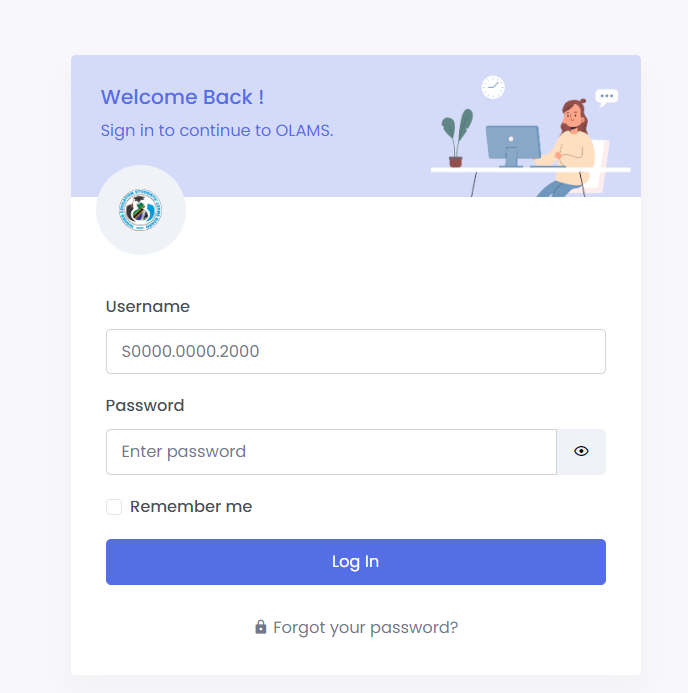
If you’ve forgotten your SIPA HESLB login password, don’t worry—there’s a fix. Click “Forgot your password?” and follow the prompts at https://olas.heslb.go.tz/olams/account/reset-password. You’ll need to enter your Form-4 Index Number again to reset it. Once done, you can return to the main SIPA login HESLB login page and sign in.
New users can register at https://olas.heslb.go.tz/olams/account/signup. Select your sign-up type, agree to the HESLB Terms of Use, and create your account. Already registered? Just use the HESLB login as registered user option.
Key Features of OLAMS HESLB Login
The OLAMS HESLB login account offers several tools to simplify loan management. Once logged in, you can:
- Apply for a Loan: Submit your application with all required details.
- Check Status: See if your loan has been approved or if more documents are needed.
- View Repayment Details: Track how much you owe and when payments are due.
- Update Information: Keep your profile current to avoid delays.
For students using DIDIS HESLB login or SIPA HESLB login, the interface remains consistent. These terms often refer to specific sections or older systems integrated into OLAMS, but the login process is largely the same. The goal? To make sure every student can access their HESLB login account without hassle.
Practical Examples of HESLB Login in Action
Let’s look at a few scenarios to see how HESLB login works in real life:
- First-Time Applicant: Maria just finished Form 6 and wants a loan for university. She visits the OLAMS HESLB login page, signs up using her Form-4 Index Number, and applies. After logging in, she tracks her application status weekly.
- Continuing Student: John, a second-year student, uses HESLB login continuous to confirm his loan disbursement for the new semester. He logs in, checks his balance, and updates his contact details.
- Forgotten Password: Amina can’t recall her SIPA HESLB login password. She clicks “Forgot your password?” on the reset page, enters her Index Number, and creates a new password within minutes.
These examples show how versatile the OLAMS HESLB login account login password system is, catering to different needs with ease.
Tips for a Smooth HESLB Login Experience
To get the most out of your HESLB login my account, keep these actionable tips in mind:
- Save Your Credentials: Write down your Form-4 Index Number and password somewhere safe. Avoid using “Remember me” on shared devices.
- Double-Check Details: When resetting your SIPA HESLB login password, ensure your Index Number is correct—small typos can cause delays.
- Register Early: New users should sign up at https://olas.heslb.go.tz/olams/account/signup well before application deadlines.
- Use a Strong Password: For your OLAMS HESLB login, pick something unique but memorable to keep your account secure.
- Contact Support if Stuck: If the DIDIS HESLB login or any other feature isn’t working, reach out to HESLB via their official channels.
These steps can save you time and ensure your HESLB login as registered user goes off without a hitch.
Common Challenges and Solutions
Even with a system as reliable as OLAMS HESLB login, hiccups can happen. Here are some frequent issues and how to tackle them:
- Login Fails: If your credentials don’t work, verify your Index Number and password. Still stuck? Reset it at the designated link.
- Slow Website: During peak application times, the site might lag. Try logging in during off-hours, like early morning.
- Forgotten Username: Your username is your Form-4 Index Number. Check old school records if you’ve lost it.
By anticipating these bumps, you can keep your SIPA login HESLB login experience stress-free.
The Bigger Picture: Why HESLB Login Matters Long-Term
Beyond immediate access, the HESLB login account ties into a larger goal: empowering students to build their futures. Each time you use OLAMS HESLB login account login password features, you’re taking responsibility for your education and finances. For continuing students, HESLB login continuous ensures support doesn’t stop after year one—it’s a lifeline throughout your academic journey.
The system also reflects HESLB’s commitment to efficiency. By digitizing loan management, they’ve made it possible for thousands of students to access funds without endless paperwork. Your ability to log in and manage your account is a small but significant part of this progress.
Final Thoughts on HESLB Login
Mastering HESLB login is more than just a technical skill—it’s about taking charge of your educational path. Whether you’re resetting your SIPA HESLB login password, signing up for the first time, or checking your OLAMS HESLB login account, the process is designed to support you. With a little know-how and the tips shared here, you can use this tool to your advantage.
So, next time you head to https://olas.heslb.go.tz/, feel confident. Your HESLB login my account is your key to unlocking opportunities, and now you’ve got the full scoop on how to use it. Ready to log in? Your future is waiting.