

 May 14, 2026
  20 mins to read
 Access your UDOM SR2 login account with ease! Check results, reset passwords, and stay updated on your academic progress.
A Complete Guide to Using UDOM SR2: Login, Results, and More
The University of Dodoma (UDOM) offers students a handy online tool called the Student Record Management System, or SRMS, commonly known as UDOM SR2. This platform makes it easy to check results, download admission letters, and manage your student account—all from one place. Whether you’re a new student figuring out your UDOM SR2 login or a returning user looking for UDOM SR2 results today, this guide will walk you through everything you need to know. With clear steps and practical tips, you’ll be able to use sr2.udom.ac.tz confidently in no time.
In this article, we’ll cover how to access your UDOM SR2 login account, reset your password, check results, and more. Let’s get started with the basics and build from there.
Key Takeaways
- UDOM SR2 is the Student Record Management System for UDOM students.
- Access it at https://sr2.udom.ac.tz/ using your username and password.
- You can check UDOM SR2 results today, download your UDOM admission letter, and manage your account.
- Forgot your password? Use the UDOM SR2 reset password feature to regain access.
What Is UDOM SR2?
UDOM SR2, also referred to as sr2 udom, is an online portal designed by the University of Dodoma to help students handle academic tasks. From signing up for your UDOM SR2 login account to checking your UDOM login SR2 results, this system keeps everything organized. The official website, sr2.udom.ac.tz, is where all the action happens. Think of it as your personal hub for university-related information.
The platform is currently on Version 2.0, as noted in the footer. UDOM SRMS (Version No. 2.0). It’s user-friendly, but if you’re new to sr2 udom ac tz, a little guidance can go a long way. Let’s break it down.
How to Access Your UDOM SR2 Login Account
Getting into your UDOM SR2 login account is straightforward. Here’s a step-by-step guide to help you with the UDOM SR2 log in process:
- Visit the Website: Open your browser and go to https://sr2.udom.ac.tz/.
- Find the Login Section: On the homepage, you’ll see fields labeled “Username” and “Password.”
- Enter Your Details: Type in your UDOM SR2 login password and username. These are usually provided by the university when you first sign up.
- Click Login: Hit the “Login” button to access your sr2 udom login account.
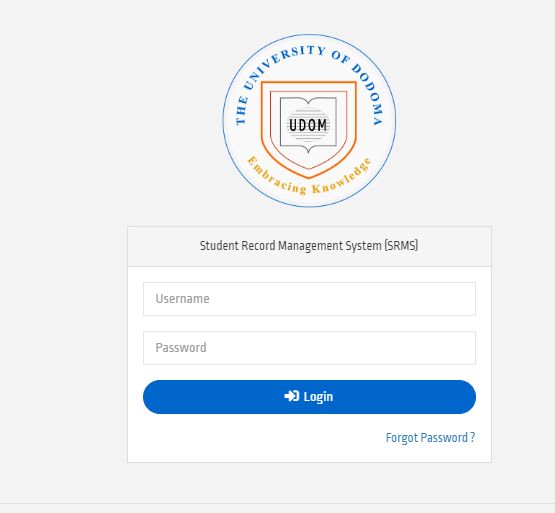
If this is your first time, your username might be your student ID, and your password could be a temporary one sent by UDOM. Once you’re in, you can explore options like checking UDOM SR2 results today time or downloading your UDOM admission letter.
What to Do If You Forget Your UDOM SR2 Login Password
It happens to everyone at some point—you forget your UDOM SR2 login account login password. Don’t worry; the UDOM SR2 reset password feature has you covered. Here’s how to fix it:
- Go to the Reset Page: Visit https://sr2.udom.ac.tz/site/request-password-reset?.
- Enter Your Username: In the “Enter Username” field, type your sr2 udom login username.
- Request a New Code: Click “Request new code” to get a reset link or code sent to your registered email or phone.
- Follow the Instructions: Use the code to set a new UDOM SR2 login password.
- Log In Again: Head back to sr2.udom.ac.tz login and use your new credentials.
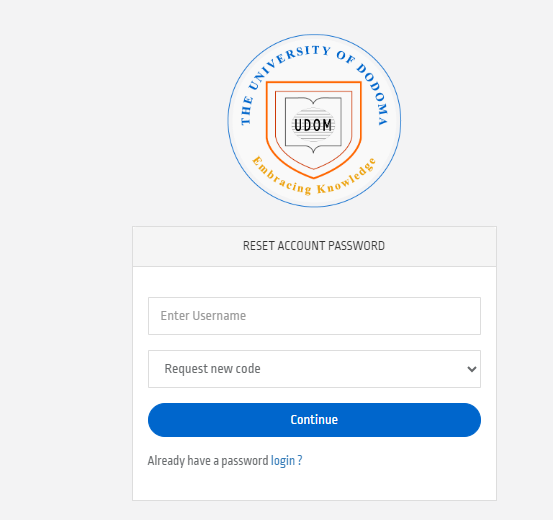
If you already have a password and just need to log in, there’s an option that says, “Already have a password login?”—click it to return to the main sr2 login udom page.
Signing Up for a UDOM SR2 Login Account
New students might need to create their UDOM SR2 login account sign up. While the exact process can vary, it typically starts with your admission details. Here’s a general outline:
- Get Your Credentials: When you’re admitted, UDOM provides a username (often your student ID) and a temporary password.
- First Login: Use those details at sr2 udom ac tz login to access your account.
- Set Up Your Profile: After logging in, you might be prompted to update your UDOM SR2 login account login details, like changing your password.
If you’re unsure, contact UDOM’s admissions office for help with your sr2 udom login account login.
Checking UDOM SR2 Results Today
One of the most popular features is checking your UDOM SR2 results today. Once you’re logged into udom login sr2, follow these steps:
- Log In: Use your UDOM SR2 login account login password at https://sr2.udom.ac.tz/.
- Find the Results Section: Look for a tab or menu option labeled “Results” or “Academic Records.”
- View Your Scores: Your latest results, including UDOM SR2 results today time, will be displayed.
The exact time results are posted can vary, so keep an eye on university announcements for updates.
Downloading Your UDOM Admission Letter
Need your UDOM admission letter? The sr2 udom platform makes it simple:
- Log In: Access your sr2 udom login account.
- Go to Admissions: Find the section for admission documents.
- Download: Click to save your letter as a PDF.
This letter is crucial for registration, so store it somewhere safe!
Tips for Using SR2 UDOM Effectively
- Bookmark the Site: Save sr2.udom.ac.tz for quick access.
- Keep Credentials Safe: Write down your UDOM SR2 login password or use a password manager.
- Check Regularly: Visit sr2 udom ac tz login often for updates on results or announcements.
- Contact Support: If you’re stuck, UDOM’s helpdesk can assist with sr2 udom login account issues.
Conclusion
The UDOM SR2 system is a powerful tool for students at the University of Dodoma. Whether you’re logging into udom sr2 login account, resetting your UDOM SR2 login password, or checking UDOM SR2 results today, it’s all designed to make your academic life easier. By following the steps in this guide, you can confidently use sr2.udom.ac.tz to stay on top of your studies. Start by visiting https://sr2.udom.ac.tz/, and you’ll be set to manage your sr2 udom login account like a pro. Got questions? UDOM’s support team is just a message away.